
Nothing slips.
Every job your business has running, every job it owes someone, and the one thing each person should do next — on one screen, in one list, ranked by what actually matters today.
Most work doesn't slip because people are lazy.
It slips because nobody could see it. The job is in someone's head, the delivery date is in an email, the variation is on a whiteboard that got wiped, and the one person who knew is on leave.
“Where are we up to?”
Answering it takes four phone calls and a scroll through the inbox. By the time you know, the answer has changed.
The date moved and nobody said
Steel is two weeks late. Three other jobs depended on that crew. The customer finds out when the truck doesn't turn up.
The spreadsheet stopped being true
It was accurate the day it was built. Now there are four copies, two of them are on someone's desktop, and none of them agree.
One list. Ranked. Every morning.
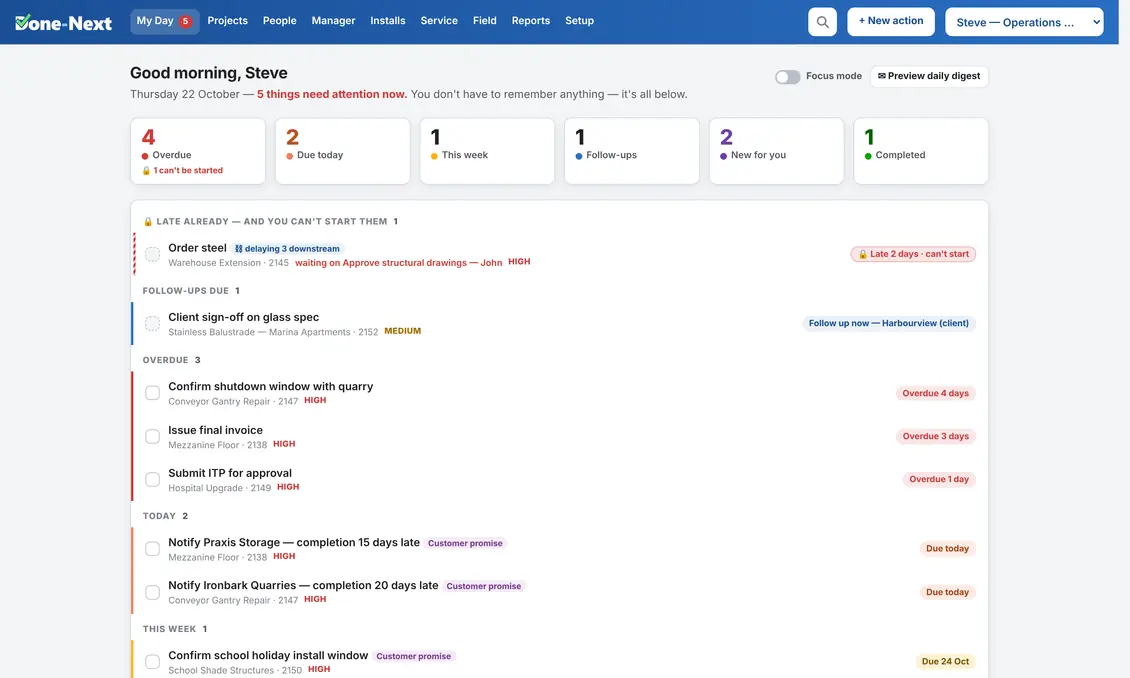
Done-Next's My Day is the whole idea in one screen. It shows one person the work that is theirs, in the order it actually matters: overdue first, then today, then this week.
Nothing is hidden behind a filter. Nothing needs setting up. Work that is blocked waiting on somebody else sits quietly at the bottom and appears the moment it is released — so the list is never cluttered with things you cannot start yet.
- You don't have to remember anything. If it isn't on the list, it isn't owed.
- It ranks itself. No dragging, no priority admin, no weekly tidy-up.
- A promise to a customer is marked as one — so it never gets bumped by something merely urgent.
Three steps, and you are running.
Not three months. There is no implementation consultant, because there is nothing to implement.
Put your people in
Names, who reports to whom, and who is allowed to approve a date change. Ten minutes. That is the entire setup that is compulsory.
Add a job
Name, customer, site, and the stages it runs through. Start from a template and the whole task list comes with it, already assigned to the right roles.
Everyone opens My Day
That's it. The list is already right, because it is built from the work rather than from someone maintaining it.
Almost any team with a list and a deadline.
A plant maintenance team does not run projects for clients — it runs work orders for departments. So the four words the system uses most are yours to set, and every screen, report and email follows. These five are just the ones already set up; the words are yours either way.
Projects & install
Fabrication, fit-out and equipment installation
See it set up →Service & maintenance
Callouts, servicing, agreements and route optimising
See it set up →Manufacturing / plant
In-house work orders raised by departments
See it set up →Trades
Builders, fabricators and small crews
See it set up →Office / departments
Work raised by one department for another
See it set up →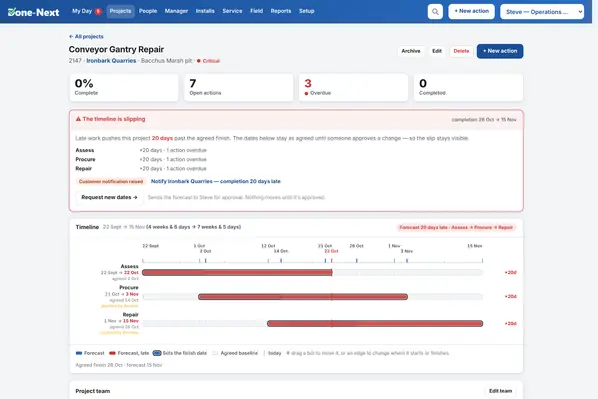
It knows what a late day actually costs.
Stages are linked the way the work really runs. When one slips, only what genuinely waits on it moves — and the system says so, by name.
- A forecast finish date that updates itself, beside the date you agreed.
- The chain that is driving the finish date, named — so you know what to chase.
- Agreed dates can only move with approval, with a reason attached.
- Every change recorded, so “why is this job late?” has one honest answer.
One button costs tomorrow and puts it in order.
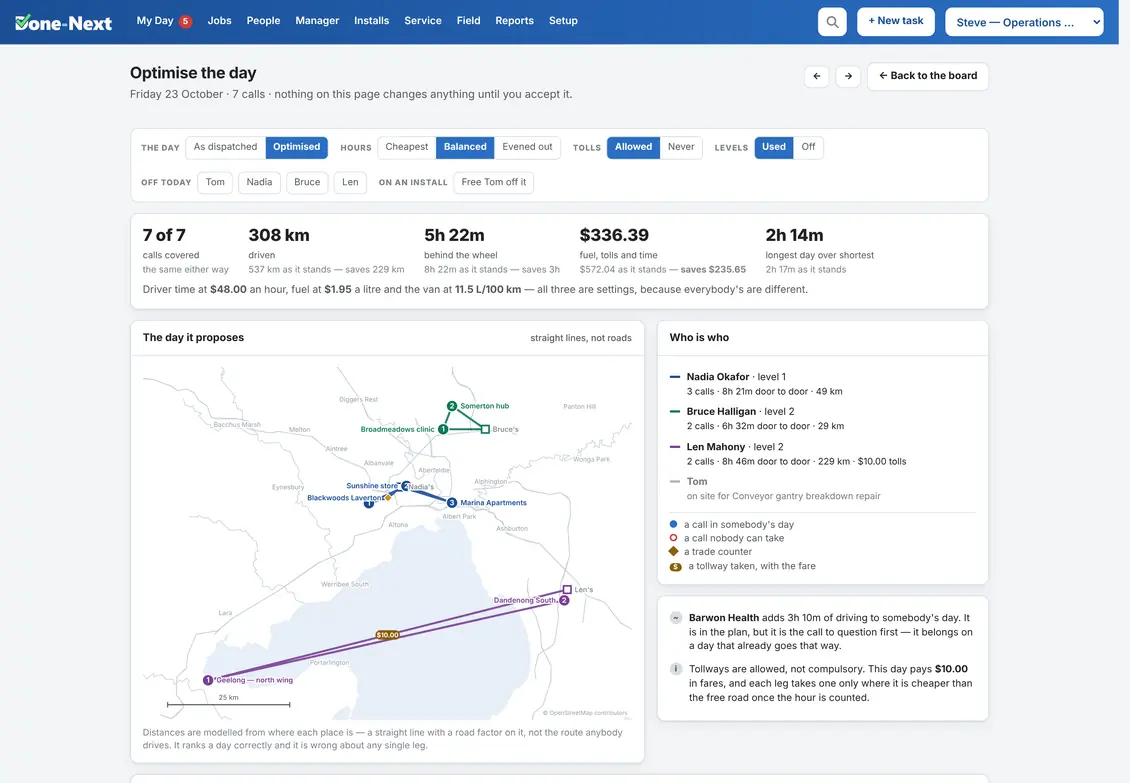
The service day board knows what a kilometre in your vans costs and what an hour of labour costs. Press Optimise and it proposes a day — in dollars, not pins on a map — and changes nothing until you accept it.
- A time you promised is never moved, earlier or later, and a call already under way is left alone.
- Skill levels and customer priority respected, so nobody is sent somewhere they are not signed off for.
- Parts collected on the way: the trade counter is a real stop, slid to wherever it costs least, by the technician doing the call.
- When nobody can take a call it says which reason it is — and names the people standing there who are not allowed near it.
- Technicians in more than one state? Each is sent as far as you say from their own home, so one board plans each patch properly without any setup.
The crew see one screen, and it fits in a hand.
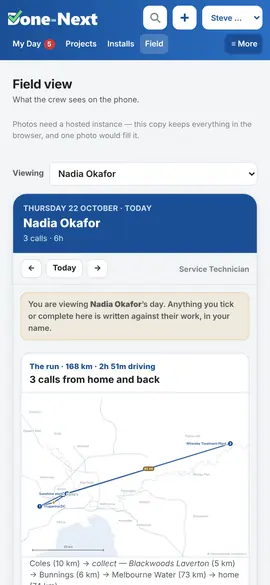
No app to install, no login your installer will forget. The field view is the same system, stripped back to today: where you are going, what you are doing, and a tick when it's done.
- Today's bookings and callouts, in order, with the site address — and any part to collect on the way, with the counter's hours and a map link.
- A photo or a note in one tap — on a call, a task or the install they are standing on — straight onto the job, from the phone.
- Tickets and licences that are expiring, flagged before the day they matter.
What Done-Next is, and what it isn't.
What it is
- A shared list of everything owed, and who owes it
- A real schedule board for crews, vans and plant
- Service calls, agreements and recurring work
- A day board that costs the run and orders it, on request
- Timelines that forecast, not just draw
- An honest record of every date that moved and why
What it isn't
- An accounting package — it doesn't want to be your ledger
- A CRM with a sales pipeline bolted on
- A tool that needs a full-time administrator
- Something that makes you work its way instead of yours
See it with your own kind of work in it.
Five live demos, each set up for a different sort of business. Click anything, change anything — it is a real copy of the software with made-up data, and you cannot break it.